Invoice statuses and chasing payment
Draft, sent, seen, overdue, paid — what each one means and what to do about it.
Open this in your portal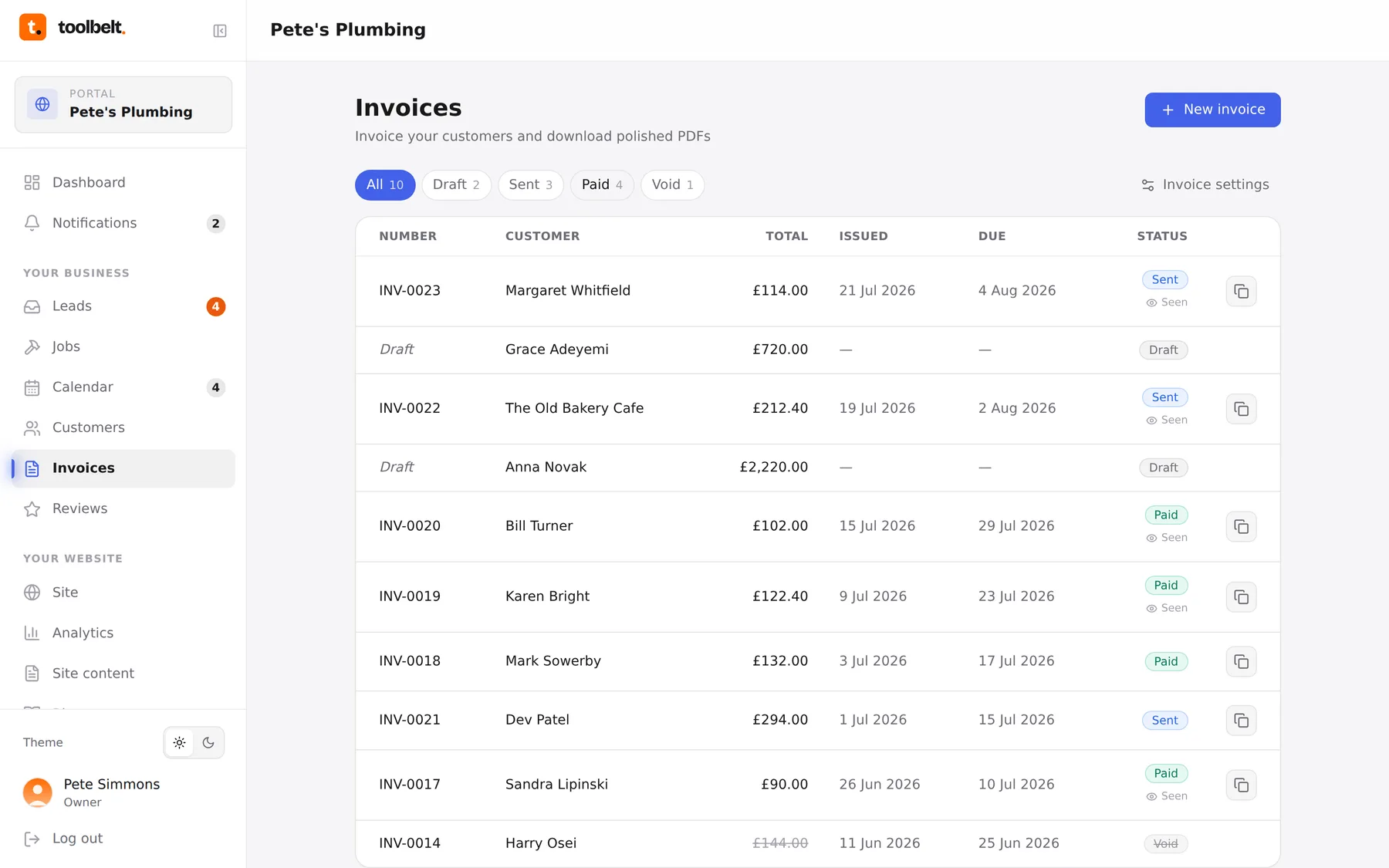
The invoice list is your money at a glance. The filter chips along the top (All / Draft / Sent / Paid / Void) each show a count — Sent is the pile that matters.
What the statuses mean
- Draft — still yours; no number, customer’s never seen it.
- Sent — finalised and shared. A Seen marker appears once the customer opens the link.
- Overdue — sent, past its due date, unpaid. Shows in red because it should annoy you.
- Paid — mark an invoice paid as soon as the money lands, and the whole system stays truthful.
- Void — cancelled after sending (wrong customer, redone work). Voiding keeps the numbering honest — never delete a numbered invoice.
Chasing without the cringe
- Filter to Sent and scan for red.
- Seen but unpaid after the due date? A short message with the invoice link re-attached does most of the work: “Just floating this back to the top of your inbox…”
- Never opened? The link probably drowned — resend it by text instead.
Tip: 14-day terms are the sweet spot for domestic work. Long enough to be reasonable, short enough that it’s still this month’s problem.